


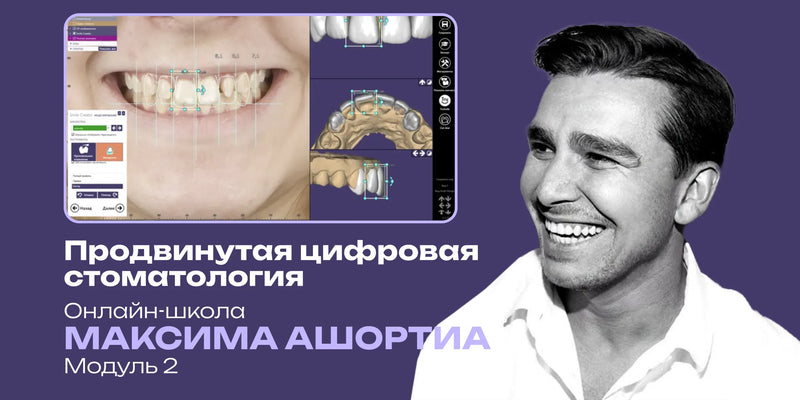
Advanced digital dentistry in EXOCAD: DSD, full removable dentures, total prosthetics, splints. Maksim Ashortia Online School. Module 2

Advanced digital dentistry in EXOCAD: DSD, full removable dentures, total prosthetics, splints. Maksim Ashortia Online School. Module 2

عن الكورس
كورس عملي متقدم بالـ EXOCAD يقدمه Dr. Maksim Ashortia، يركز على تصميم أصعب التركيبات رقمياً. يغطي الـ Smile Design والـ Splints والـ Complete Dentures.
مناسب لـ: طبيب الأسنان العام والجراحين المهتمين بالـ Digital Dentistry
شنو راح تتعلم:
- تجهيز الـ Scans وتصميم موديل للطباعة
- الـ Smile Design داخل EXOCAD
- تصميم الـ Splints والـ Custom Trays
- تصميم الـ Full Removable Denture وتعويضات الـ Implant
Advanced Digital Dentistry in EXOCAD: DSD, full removable prostheses, complete denture, splints. Maxim Ashortia Online School. Module 2
Course overview
Practice-oriented course dedicated to mastering the modeling of the most complex constructions in EXOCAD—a powerful tool for digital dentistry.
During the course you will learn to model the main orthopedic and surgical constructs.
Upon completion you will be able to:
Create Smile Design in EXOCAD
Model splints in EXOCAD
Step-by-step modeling of templates for gingival correction
Model custom trays
Perform total modeling on implants with a virtual articulator
Model a full removable denture in EXOCAD.
The course fully covers all aspects of modeling the main constructions and is intended for dentists and surgeons.
Course lessons
Lesson 1. Removable model for printing
Import STL files into EXOCAD
Checking the accuracy of scanned jaws
Preparing scans for modeling
Modeling tooth anatomy
Selecting a library of tooth forms
Aesthetic design and final refinement
Preparing files for 3D printing.
Lesson 2. Smile Design in EXOCAD
Goals and objectives of digital smile design
Advantages of using EXOCAD for aesthetic planning
Combining photographs and scans for accurate visualization
Analysis of the smile line and facial proportions
Determination of the midline, interpupillary line and nasolabial landmarks
Aesthetic parameters: shape, size and proportions of teeth
Working with tooth form libraries
Transferring design for further modeling (Mock-up, Wax-up)
Resizing and reshaping teeth in the digital project.
Lesson 3. Nuances and tips for working in EXOCAD
Overview of hidden features in EXOCAD
Optimizing the interface for specific tasks
Configuring hotkeys to speed up work
Speeding up the design process
Correcting common errors
Useful function combinations to save time
Working with micro-relief and surface texture
Selecting tooth forms depending on the clinical case
Tips to minimize errors when working with occlusion.
Lesson 4. Modeling splints in EXOCAD
Splint modeling:
Assembly of scans in articulator
Separate scans
Project filling
Determining insertion path
Splint design.
Modeling a positioning splint.
Lesson 5. Step-by-step modeling of the gingival correction template
Review of scans and project filling
Analysis of the gingival contour and the aesthetic smile line
Aesthetic planning considering portrait photography
Determination of the gingival correction level according to the treatment plan
Modeling the template for gingival correction
Discussion of clinical cases.
Lesson 6. Modeling primary telescope
Overview of scans and project filling
Matching scans
Principles of telescopic retention
Differences between primary and secondary telescopes
Indications and clinical cases
3D modeling of primary telescopes
Transferring telescopes for milling.
Lesson 7. Step-by-step modeling of Wax-Up
Importing STL files of maxilla and mandible into EXOCAD
Assessment of occlusion, smile line and aesthetic proportions
Aligning the patient photo for precise aesthetic planning
Building the basic tooth form considering anatomy
Setting height, thickness and contour of crowns
Selecting tooth forms from the EXOCAD library
Transferring the wax-up design to prepared teeth
Defining the preparation boundary
Determining the insertion path
Adapting the tooth library to preliminary preparation
Checking contacts and occlusion in a virtual articulator
Adjusting micro-relief and optimizing tooth contours
Preparing the model for 3D printing.
Lesson 8. Protocols for modeling a custom tray
Importing STL files
Defining the boundary of the custom tray considering alveolar ridge anatomy
Setting detention zones for stable impression fixation
Creating a handle
Exporting STL file for 3D printing.
Lesson 9. Total modeling on implants with a virtual articulator
Overview of total modeling: indications and clinical tasks
Using a virtual articulator for accurate occlusion
Importing STL files of jaws
Building a baseline tooth row on implants
Planning denture design considering anatomy and aesthetics
Printed prosthesis vs milled prosthesis
Fabrication of a surgical guide
Technical aspects of choosing a construction for implant-supported prosthetics
Protocols for fabricating temporary reinforced structures
Stages of 3D prosthesis modeling.
Lesson 10. Modeling a full removable denture in EXOCAD
Preparatory stages for denture fabrication in EXOCAD
Protocol for creating an occlusal template in EXOCAD
Manufacturing the model during denture creation: demonstration
Transferring temporary constructions and adjusting the articulator
Plastering method in the articulator
Adjusting contacts and functional movements
Exporting STL file for 3D printing.
أسئلة شائعة عن الكورس
من محاضر الكورس؟
الكورس مقدم من: Maksim Ashortia
كم مدة الكورس وكم درس فيه؟
الكورس يتكون من 10 درس، ومدته الكلية 4 ساعة و48 دقيقة.
هل الكورس كامل أو مجرد فيديوهات من يوتيوب؟
الكورس اشتراك كامل بكل الدروس المذكورة بالوصف (10 درس)، وليس فيديوهات يوتيوب أو مقاطع متفرقة.
متى يتفعّل الكورس بعد الدفع؟
التفعيل فوري خلال دقائق من إتمام الدفع في أغلب الحالات، وتوصلك رسالة على البريد الإلكتروني بكل تفاصيل التفعيل.
ما هي طرق الدفع المتوفرة؟
للأطباء داخل العراق: زين كاش، سوبر كي (ماستر الرافدين)، FIB أو رصيد آسيا سيل.
للأطباء خارج العراق: البطاقة البنكية، أو طرق دفع محلية في بعض الدول مثل مصر والجزائر وفلسطين وغيرها.
هل الدفع آمن؟
نعم، جميع عمليات الدفع محمية عبر بروتوكولات أمان SSL.
إذا صارت عندي مشكلة بالتفعيل، شنو الحل؟
فريق الدعم متواجد عبر واتساب أو تليغرام أو البريد الإلكتروني support@dentalcourse.store. وإذا كانت المشكلة بالتفعيل أو خلل من طرفنا، نستبدل لك الكورس.


